Showing posts with label seo. Show all posts

Thursday, 14 November 2013

Free Download Avada V3.2.1 *Clean* Responsive Multi-Purpose Theme

Avada V3.2.1 *Clean Responsive Multi-Purpose Theme

Avada - One of the most famous and likely used responsive Wordpress theme. The premium sliders of this theme is surely an attraction and the headers used are simply blissful. The admin panel used for customization is user-friendly and shall make it easier for users to build their website in a go. 

There are various custom options and shortcodes used, serving as a basis for installation of posts and various other tasks required. A large number of colors and fonts are included in order to give it a very likely presence. Cross-browser comaptibility is surely a thing to look for. 

Please check out the demo for more details about the theme, and you can download the theme for free by clicking the download image

Demo Link
http://themeforest.net/item/avada-responsive-multipurpose-theme/2833226

Download
http://www.kingfiles.net/8fip49pzaym6/Avada_-_3.2.1.zip

Read more ...


Free Download Sahifa v4.0.2- Responsive WordPress News,Magazine,Blog

fre9x90.png (590×300)
Sahifa v4.0.2- Responsive WordPress News,Magazine,Blog
Theme Features
  • Fully Responsive ( with Option to Disable it ) .
  • Retina Ready .
  • WooCommerce Ready .
  • Buddypress Ready .
  • WPML Ready .
  • bbPress Ready .
  • Responsive Google AdSense
  • Compatible with Infinite Scroll plugin .
  • Mega menu for categories .
  • Dark Skin .
  • RTL Support .
  • Drag Drop HomePage Builder with 4 Styles ( Blog , Style1 , Style2 , Style3 , Style4 )
  • Unbranded Powerful Admin Panel .
Demo
http://themeforest.n et/item/sahifa-responsive-wordpress-newsmagazineblog/2819356

Download (Working)

http://www.kingfiles.net/5t7gaujb5gbi/Sahifa-Theme.zip

Note : Please use this theme only for educational and testing purpose. For commercial, buy it from it's official website.
Read more ...


Sunday, 10 November 2013

How to Write SEO Optimized Blog Posts

I'm not a SEO Expert, nor what we will read further is a top secret, but this is about the basic positioning that everyone should apply in order to optimize their blog posts. And with these techniques, effort, and a lot of patience, we can occupy the best places in the search results of different search engines.

For sure not all the cases are alike, neither all blogs are positioned in the same manner, some might have greater competition than others depending on how popular is the topic that they handle, thus, when it comes to web positioning, there's no specific time that applies for all. Having said this, let's begin.

Focus on a topic


Whatever the theme of your blog is, when writing a post, try focusing on a definite subject that has a clear objective and has no distractions. For example, if you write about Digital Cameras, then the beginning and the end of the post should be only about it. Don't start talking about digital cameras and end up telling about what you have done last weekend. A reader goes to a page because is looking for a specific information, so unless it is not a personal blog (where you write about your daily life) do not digress.

Define the post title


The post title should be precise, so that you can briefly summarize the content of the post, but you must not abuse this either, and although it should be concise, do not save words that might be keys to the search.

Examples:
Collection of all the cameras that have been released last year on the market
The best digital cameras of 2012
Clearly, the first one hasn't been defined very much and the second is not only more accurate but it is more appropriate as well, for what people are searching on the internet.

The keywords


Keywords are those terms that the most people search for on the internet and you should try focusing on them when writing an article; these keywords have to be included throughout the entire article but you should be careful not repeating them too many times.

Example:
During the fourth week of the technology, there were many products that are utilized today, and the most famous experts gave a speech on them.
At the opening of the fourth Technology Week, the experts talked about various topics, including how to choose a digital camera, had discussions about the pros and cons of the iPad, and which are the best smartphones.
In the first example we have written without giving importance to any terms, meanwhile, in the second one, we used phrases that are searched on the internet by the most users.

So, the most frequent search terms should be included wisely without cluttering your posts with them, or it can be counterproductive.

These keywords should be added in the title of the posts, as well.

Rely on synonyms


While it is good using keywords, we should not limit ourselves to a single word. It is recommended using synonyms because users do not name things in same way and using less keywords, you'll avoid leaving the reader under the impression that you are being repetitive and insistent.

Examples:
For those who like good quality pictures, Nikon D7000s Digital Camera is a 16.2 megapixel digital camera that takes great pictures.
For those who like good quality images, Nikon D7000s is a 16.2 megapixel digital camera that takes excellent pictures.

In the first example we have repeated the word digital camera and pictures twice, meanwhile, in the second one, we used the digital camera keyword once and changed the word pictures with images.

This way, the reader will find a greater diversity of words and might enjoy the article more.

Using bold and italics


The main keywords should be highlighted, so that they will stand out from the rest; this is taken into account by the search engine robots being like some kind of lures for them, so the words with which you want to position yourself, need to be highlighted with bold, but be careful, this shouldn't be done with CSS, but with HTML, i.e. they should not be tagged with font-weight: bold; but rather with <b> or even better, with <strong>.

Examples:
For those who like good quality images, Nikon D7000s is a 16.2 megapixel digital camera that takes excellent pictures.
The result seems to be the same, but it is not. Although the three sentences are in bold, only one is more attractive to robots, which is the first.
For those who like <span style="font-weight: bold;">good quality images</span>, <strong>Nikon D7000s</strong> is a 16.2 megapixel <b>digital camera</b> that takes excellent pictures.
The same goes for the italics, use them for highlighting important words, but do not put them between font-style: italic; but rather between <i> or even better <em>.
For those who like <span style="font-style: italic;">good quality images</span>, <em>Nikon D7000s</em> is a 16.2 megapixel <i>digital camera</i> that takes excellent pictures.
Again, the first has a better chance of positioning than the others. So, it is recommended to highlight the keywords in bold and italics, or to put them between <strong> and </strong>, or between <em> and </em>.

Using links


Some believe that we shouldn't use links in the posts because this way we are giving away our Page Rank. This is not quite true, using referral links to sites that have already shaped their credibility, will also help us to shape our own. Certainly, we should not flood our posts with links, but we can do it when is necessary and especially with sites that address the same topics as you.

Also, avoid putting the typical "click here" or similar texts. When you put a link, the anchor text should be fairly descriptive.

Examples:
<a href="Link URL">Click here</a> to know more
More information about <a href="Link URL">digital cameras</a>
In the first example, the anchor text is not relevant and descriptive, in the second it is.

Illustrating with images


Articles with images are not only visually appealing, but might help the reader to understand what you are talking about, thus, whenever you can, use an image in your post to illustrate the publishing, but do not overdo it, because many images or very large images can slow the loading time of the blog.

New and relevant content


You should focus not only on writing many posts, but also making them relevant to your readers. New and original content is more attractive to the search engines than a copy & paste and actually, the last gets penalized. So try to write new stuff, even if you think that all has been said, it isn't so, each person has a different way of saying things.

Also, always try to get informed before writing an article; do a research and see if the information is valid, based on that, you will gain the trust of your readers.

With these few techniques you can increase the chances of positioning your posts on the internet. As I said earlier, these aren't things that no one heard about, but I know that many are beginners and don't know how to optimize the blog posts.

It does not hurt repeating that the positioning is not given overnight, but with some effort and patience, you should see the desired results over time.
Read more ...


Saturday, 26 October 2013

Top three qualities of a successful blogger

The qualities of a blogger should be attended at all times in order to become someone popular on the internet, a blogger should have plenty of ideas for creative writing, along with a truckload of motivation. The results sought will not come overnight, there's no guarantee that this will be easy. What we need first are two things in order realize your dream of running a successful blog: a lot of exclusive content and readers' loyalty. In each case, time is required to develop the success. This is a process and not a short-term event.

qualities of a blogger

Top Qualities To Become a Successful Blogger 


Here are three qualities of a blogger who as a site administrator will need to have, if his goal is to manage a successful blog.

Patience

A successful blog is a product of time and effort and as a site administrator, you will need patience. As I said before, the results will not arrive quickly overnight, therefore, it is important to realize this from the start. If you are constantly trying to develop new and creative ideas for writing on your blog and at the same time you are worried if you will see any results, this will only make things more difficult. The building of a blogging platform is a "long term" effort, so, you must decide whether to accept the challenge or not. This is one the most important qualities of a blogger.

Credibility

Much of the traffic of any successful blog is based on publishing unique content, as well, its credibility. In fact, the quality of what is in the site will have a direct impact on what will become viral visitors that are coming to your platform. If you will provide quality content, then people will talk about your blog, and if they do, others will come to see what you have. Depends on you to publish useful and accurate information, your readers will do the rest.

Consistency

Maintaining a steady stream of creative writing ideas is vital to be able to constantly update the blog. The frequency of publication to a proper schedule is related to the amount of time you have available and your level of motivation. However, it is important to establish a sort of consistency, so that people can schedule their own visits accordingly. Just remember that the more often you write, the more people will visit, so their loyalty will grow faster and their referrals will be extended.

For becoming a popular blogger is important having a healthy source of creative writing ideas, along with a lot of patience and motivation. Ultimately, it will be reduced to you as the system administrator to provide the three qualities of a blogger that we discussed above, who is searching tirelessly his goal of having a successful blog. In the end, your own motivation and patience will be the glue with which all the elements will be put together so that your dream will come true.
Read more ...


Tuesday, 22 October 2013

How to do natural SEO on Blogger

Although many insist that blogs hosted on free servers, such as Blogger, are not ideal for performing a correct positioning of your web site, the truth is that a blog hosted by Blogger can be really well positioned and quickly on the Internet if you are using the right SEO tools.

blogger seo

Now, given the latest updates from Google, the best would be hiring a specialized person, however, if we don't have the resources or we want to learn doing this job alone, we can choose to begin with the natural positioning. Here are some tips to start a SEO work (Search Engine Optimization).

The first thing is to pick a correct domain

We must try having our keyword included in our domain name, of course, this may sacrifice our branding but we can use the redirection.

Create Value Added Content

Not only rewrite articles, or write like they would be intended for us. While writing our posts we should consider our target audience, i.e., giving advices, tips, suggestions or guidance on specific topics and, aside, place links, use anchortext and keyfrases.

The topic of the links is important

They should be of quality and while, is no longer required to place five or ten links within the text of your website, now what matters is that the link is relevant to the context.

Finally, the domain, in value-added content and a right use of the internal and external links, will not be useful if we don't try to update our blog constantly.

How often should you update your blog?

This is not necessary to be done on daily basis, although this may be ideal as in this way we could achieve a greater relevance in search engines, but has to be a constant work. Let's say, two or three times a week would be enough, what should not happen is updating only three times a week and doing nothing next week.

Keep in mind that search engines happen to pass daily on our blog in order to index our content.

I hope that you find these SEO tips useful and if you would like to receive more tutorials by email, subscribe for free to this blog, check out the facebook page or add the RSS feed.
Read more ...


Sunday, 20 October 2013

4 Alternatives to Google AdWords

Many think that Google AdWords is the only tool dedicated and available to perform a study such as a keyword search, but it isn't so, today I refute this idea by collecting some alternatives that, although are not equal to Google AdWords, at least encourage us to make good keyword analysis for the SEO of our website.

alternatives to google adwords

Going back a bit, for those unfamiliar with the main features and tools of Google AdWords, we can find a very simple interface yet complete in every sense.

- AdWords appearance has changed, however there is a chance of returning to the old design;
- allows you to place a phrase or keyword, a web site and use the categories;
- for a better keywords search, you can apply filters such as location, language and add custom fields (competition, local or global monthly searches, CPC, Ad share, etc.);
- displays keyword ideas in columns with the amount of local and global monthly searches and approximate CPC;
- you can download keyword ideas, search results in a format to open with Excel.

Having recalled and refreshed the memory a little with the characteristics of AdWords, now it is time to learn about other options both free and paid.

Google AdWords Alternatives


Bing Webmaster Tools: Bing may not be the tool that we had first thought of, however it wants to provide the best conditions for studying keywords.


After we register, to access the tool, go to Diagnostics & Tools and click on the second option on the list: Keyword Research.

SEMRush: Other freemium alternative that displays a very complete report of a particular keyword or website. However, it has limitations and if you opt for a PRO recurring plan you need to pay a monthly membership from $69.95 per month.

Ubersuggest: This nice and simple online tool searches keywords suggestion as well as potential titles for an article. Personally, I recommend it 100%.

Keyword Eye: If you are looking to perform a keyword research on a particular region, Keyword Eye will be your help. It also has the option of requesting the display of search volume or AdWords competition and a full report of anchor text, keywords and domain.

At first it offers a free plan with limitations and to enjoy all other benefits, we have to pay $9.99 per month.
Read more ...


How to Add Google Analytics to Blogger

Google Analytics is a platform created with the purpose of helping us to track the number of visits and page views on our blog, which also uses several filters to check exactly from where the visitors are coming via standard or custom reports.

Google Analytics is the leading free tool that has a good relationship with the internet marketing and offers suggestions and improvements or benefits for our website.

As Analytics is part of the variety of Google tools like Blogger, many bloggers still don't know if it is possible to add the tracking code in Blogger. Implementing analytics in Blogger is very quick and easy, so you don't need to be experts or web developers. Here's a small guide for placing the Google Analytics tracking ID on our blog.

google analytics

Implementing Google Analytics on Blogger


1. Do you have a Google Analytics account? Then it's perfect. If you don't have one, please Register.
2. Within the account, we'll go to Admin and in the Property column, click the menu, then click Create new property, where we enter the information from the website.

create new property in google analytics

3. Click on "Get Tracking ID" and it will provide a box with a code, select and copy the code (CTRL + C).

get google analytics tracking id

4. Now let's go to our Blogger account.
5. Look for your blog and click on it, then go to Template > click the Edit HTML button and paste the code previously generated in Analytics before the </head> tag (CTRL + F in order to find it).

And this would be the entire procedure. Within about 24 hours, we shall see the first statistics of our blog in Google Analytics, otherwise check the following:

- Double check that the code has no spaces or characters.
- Doesn't have errors in the configuration
- There are no poor implementation of the filters.
- The Flash plugin is working or javascript is enabled.
- You will have minor issues if you are receiving visits from China (this conflict is not yet solved, according to Google).
Read more ...


Saturday, 19 October 2013

How to Increase Alexa Ranking of your Blog

The Alexa Rank in its time had a good importance for the SEO, however, these days is already losing its importance due to the changes in the algorithm that Google applies from time to time.
boost alexa rank

The network displays information about visitors of a website, which in turn classifies this in a ranking, also generates an estimated statistics about visitor traffic and links pointing to the website.

In a few words, the Alexa Rank does not directly affect SEO, but rather serves as a reference for measuring the traffic type, popularity by country and other metrics, although some companies that have a ranking below 100,000, whose purpose is to make room for their business are carried away by the web site.

For others more skeptical, the Alexa Rank is an essential part for search engine optimization and I will not contradict this, since everyone has their opinion on this aspect. If you would like to enrich or have a good Alexa Rank of your website, here I present some ways to do it and with short-term results.

how to improve alexa rank

5 Ways to Increase the Alexa Rank


Daily Content: Try to publish at least 2 articles per day and within a month you will start to notice changes in alexa ranking, guaranteed.

Install Alexa Rank widgets: Besides notifying about the results of your alexa ranking, it also makes an estimation of the backlinks to your website. There are three types of widgets: button with ranking and links, the other one with the ranking only and finally a graph with daily records of visits. Traffic Widgets

Alexa Toolbar: From experience, I highly recommend installing the Alexa Toolbar, because when we access a website, Alexa takes it as important visit and thus, better results in the ranking. And of course, it will give you information about the links of a web site, popular pages, reviews, and more features.

Request a review: To calculate the alexa ranking of a website, besides taking the amount of daily and monthly visits, the number of reviews or opinions made with stars also play a role in the ranking. Ask your users or purchase alexa opinions about your website.

Number of backlinks: As I said earlier, the number of visits and reviews about your website used to calculate the alexa rank and the total number of quality backlinks, increase more the chances of achieving a favorable ranking for your website.
Read more ...


On-Page SEO Tips for Blogger

We know that SEO Off Page is all the optimization that can be done off the page, such as link wheels, reviews, social bookmarking, social media (references and followers), sidebar links, among other techniques.
seo on-page optimization for blogger
However, is useless optimizing outside the website, if within is not created the same process, this mostly because the search engines (especially Google) pay much attention to alt and title tags (for images), meta tags, internal links, robots and so on, in order to display the content of your web page to the user who made a specific query in the search.

It all sums up to a non-optimized webpage without quality, so that it will not reach the traffic expected to have.

To never fall in this depression of search engine optimization, you can choose a good and reliable blog platform like Blogger, which is not like WordPress, but has similar characteristics. If you are working only on Blogger, today I will show you several really good tips to optimize SEO On Page on Blogger and become successful in daily visits as Internet popularity.

Important On-Page SEO Tips For Blogger


Implementation of the robots.txt file: besides alerting Google search engine, this file also helps us to prevent certain pages being indexed by Google in order to protect our blog against duplicate content issues.

Title optimization: In the default blogger template, post titles are not optimized properly for the search engines. To solve this, we need to touch some code in the design and optimize both page and post titles.

Image optimization: Whether your blog is about pictures or images as general topics, by simply placing a keyword related to articles, by compressing the image and placing the title=”" and alt=”", we would be optimizing SEO On Page a bit more.

Internal links: Internal links within posts on our website will not only increase page views, it will also help us to be well ranked in search engines.

Blog's loading time: When you start with a blog either new or old, is important to offer a user experience filled with a fast loading time without saturation of objects. Search engines give higher priority to a faster blog than to a slow or saturated one.

Using Google Webmaster Tools: After making sure that your blog is 100% SEO, this amazing Google tool will provide you support with both fast indexing and broken links, HTML improvements, page errors and many other specific suggestions for your website.

Got any other ideas or thoughts about natural and positive techniques to improve the On Page SEO on a web page?

Express them in a comment!
Read more ...


Adding a Meta Description to Blogger

An important part of a good SEO is the implementation of meta tags, which are commonly located in the header of our website, that are being, in the same time, invisible to users visiting the site. Well, to be more succinct, these tags have only one purpose: to include information about the page such as author name, date, key word, description, title, among others.

However, here we will only mention one, which is the meta description in Blogger. This description will appear as a fragment in the search results and as a description when sharing on Google+, Facebook and other social networks. A clear and precise description increases the chances of getting more clicks or visits.

As we will work only on the Blogger platform, here I will leave a little guide to easily add a meta description.

Meta Description in Blogger


The first thing we will do is going to our Blogger dashboard and from there, go to Settings > Search preferences > Meta Tags > Description and click on Edit.

meta description

Then check the box "Yes" to enable search description. Finally, click the "Save Changes" button.

Adding Meta Description To individual Posts


Now we will focus on adding the meta description to individual pages. Simply edit the page or post, look for the Search Description setting, and there we enter the text and save by clicking the Done button.


And that's it. However it is best to test if it works and we will do so with the MetaChecker online tool, where we only have to introduce the url of a post or page, click Analyze and then it will show the results, including a complete analysis of keywords, on-page seo , meta tags, URLs, current server status and a rating bar that goes from Horror to Excellent.

If none of the meta descriptions appear (rarely fails), we can do the process manually, but it requires us to touch a bit of code. In this case, go to Template > Edit HTML and insert before <b:skin><![CDATA[ the following code:
<b:if cond='data:blog.metaDescription != &quot;&quot;'>
  <meta expr:content='data:blog.metaDescription' name='description'/>
</b:if>
Of course, we will use again the previously mentioned tool to ensure that the description is placed correctly and if all goes well, our blog would be ready to face a good SEO.
Read more ...


Tuesday, 15 October 2013

Top High Page Rank Dofollow+Auto Approve Blogs of 2013

You cannot rank your website if you don’t have backlinks. There are various ways to achieve backlinks and among them commenting on high page rank Do-follow blog is one of the easiest way. Just need to comments with providing your website link and you will get a lot of backlinks. Only one problem that is blog site should be do-follow high page rank and approve.  In this post I will provide Top 20 High Page Rank Dofollow+Auto Approve Blogs of 2013.

1. http://moovieguru.blogspot.com/

2. http://www.educause.edu/blog

3. http://pressblog.uchicago.edu/

4. http://delong.typepad.com/

5. http://www.grokdotcom.com/

6. http://links.org.au/

7. http://www.currybet.net/

8. http://blog.mofuse.com/

9. http://www.socialtimes.com/

10. http://weblogtoolscollection.com/

11. http://www.seomoz.org/blog

12. http://www.communityspark.com/

13. http://focusorganic.com/

14. http://www.layercake.net/

15. http://www.hobo-web.co.uk/seo-blog/

16. http://www.krisbuytaert.be/blog/

17. http://blog.dmbcllc.com/

18. http://therenegadewriter.com/

19. http://www.iayork.com/MysteryRays/

20. http://www.lifeinthefastlane.ca/
Read more ...


Saturday, 20 July 2013

How to Add Robot.txt in Blogger

Few Days Ago, I have Written an Post About How to Add Robot Header Tag in Blogger or Blogspot and I have Said that I'll Soon Post a Article on " How to Add Robot.Txt "  in Blogger and Now We are Getting into it. Robot.txt is an Important Configuration into a Website because Robot.txt instruct the Search Engine Bots and tells them which part of the blog they have to access and crawl. When You add Your Sitemap in Any Webmaster Tool and When Search Engine Bots are crawling Your Site first they check robot.txt then according to the robot.txt they crawl into Your Website and Index Pages in it.

                                            Today, Robot.txt Configuration is uses by Professional Blogger also Because in this SEO Competition this trick Really Help them to increase the SEO Rank and Blog Traffic Also. When a Pro Blogger are Using this Trick then we the Simple Blogger should also Use this Trick to Make Our Blog Pro.

[Must Read: How to Optimize Robot Header Tag in Blogger ]


Steps to Add Robot.txt


  1. First Login into Your Blogger Dashboard >> Setting >> Search Preference.
  2. Go to Crawling Section and Look For Custom Robot.txt.
  3. Now Copy & Paste the Below Code There


User-agent: Mediapartners-Google
Disallow:
User-agent: *
Disallow: /search
Allow: /
Sitemap: http://www.trickuniversity.me/feeds/posts/default?orderby=UPDATED


    4. Please Replace the Highlighted Code By Your Website URL.

    5. Now You're Done Congrats You Have Done Your Job.


Conclusion

This Trick will Increase Your Blog Chance to Be Up in the SERP and the Search Engine Bot will also Crawl in wanted area and Increase Your Blog Traffic and SEO Ranks.

Read more ...


Thursday, 12 April 2012

Ways To Increase Page Impressions and Traffic on Your Blog

What is a Google AdSense "Page Impression"?

The page impressions or page views - how much time a user stays on your website and how many pages are visited. This is one of the most important things when talking about advertising. Page impressions are the result of good high quality traffic which is mostly based on the quality of the content available on your blog/website. If you build high quality content then people will enjoy navigating through your site and therefore, create page views.

In general, AdSense reports show the following fields of information:
  • Page Impression: how many times the page or pages containing the AdSense advertisement was shown to your blog/website visitors
  • Clicks: the number of times visitors clicked on an advertisement from your site
  • Page CTR: The clickthrough rate of an advertisement is defined as the number of clicks on an ad divided by the number of times the ad is shown (impressions), expressed as a percentage. (1) In most cases, a 2% click-through rate would be considered very successful, though the exact number is hotly debated.
  • CPC: is Cost Per Click. That is what Google pay you per click.
  • Estimated earnings: Your account balance for the time period selected. This amount is an estimate that is subject to change when your earnings are verified for accuracy at the end of every month.(2)
Below are some ways that could help you to increase the page impressions:

1. Navigation Menu

Create a navigation structure that is clear and easy to follow. You want to make sure that once you have a visitor, they can easily make it to other parts of your blog. Creating links within your blog pages is one of the best ways to increase the number of impressions for your website.


2. Posts Summary on Homepage

A very good method to increase your page views is to have a summary of your posts on your blog/website homepage. That will force visitors of your blog to click on posts link / read more button in order to see the full article. To show only a part (excerpt) of Blogger posts, read this tutorial:
Automatic Posts Summaries for Blogger with Thumbnails

3. Improve Blog/Website Load Time

If a blog’s pages load very slowly, then visitors will eventually lose patience and stop visiting more pages, sometimes sooner rather than later. A blog that has quick loading pages is a pleasure to browse and it encourages more clicks.

4. Add a Popular Posts widget
web hosting, forums, css, earn money

Another great way to engage your readers to stay more on your site/blog and to browse through your content and make more pageviews is to add a Popular Posts Widget where you share some of the best posts on your blog.

Here are some nice Popular Posts widgets for your Blogger blog:

Popular Posts widget above Blogger Posts
Multi-Colored Popular Posts widget


    5. Add a Random Posts Widget

    If you have loyal visitors who come to your blog on a daily basis, a popular article widget will become boring just because they see it every day, with same posts. A random posts widget will mix the articles so that the probability for a post to repeat will be very low.

    Want to add a Random Posts Widget for your Blogger blog? Then take a look at this tutorial:
    Random Posts widget with thumbnails

    6. Link to Related Posts at the End of a Post

    how to, tricks, awesome
    Displaying a related posts is a smart way for keeping your site visitors around. The widget links to stories that are relevant and interesting to readers of a particular post, keeping them engaged with your blog, and increasing your traffic.

    If you don't have it on your blog yet, see this Related Posts Widget tutorial for Blogger blogs: Add the Related Posts Widget with Thumbnails to Blogger


    7. Add internal links to your content using related anchor text

    Include a link in a new post to related information in a previous post. When you link to a previous post that you've written you should consider doing it so with descriptive words of the post, rather than generic words. (don't use simple words like "click here for more"). Adding links to previous articles will determine your visitors to view articles and automatically will be converted into page impressions.

    8. Provide links into your social networks profiles or forums

    Share your blog links on Facebook, Twitter or any other websites or popular forums. Answer to questions on the web. But be careful to not be too intrusive and always try to give pertinent info.
    You wouldn't want to support or to be considered as a spammer, don't you?

    9. Add a search box

    A lot of websites does not have a search box. As a result, the visitor will leave the site if he didn't find anything further relevant. For best results, you should be using the Google custom search widget. You can embed the Google search box directly in your blog. The search results will be more relevant than those that are provided by your default search box.


    10. Add Social media buttons 

    Give your visitors multiple options to tweet, bookmark and share your posts via Facebook as well as save your whole blog. Put social icons below your post and in the sidebar, make them visible and let them be found easily.

    11. Use a clean background for your posts and readable fonts

    Avoid dark backgrounds, tiny and sophisticated fonts, and make written content the visually most distinct part of your blog. If your main objective is to deliver a message and get the visitors reading your stuff, then you should make this process comfortable for them.

    12. Advertising

    And finally, getting people to your site may just be a matter of getting the word out. By using pay-per-click advertising, you can create an inexpensive advertising campaign to get more people to your site.

    Following these tips will surely increase your blog's page views, which will make your blog traffic high in the future. Good luck!
    Read more ...


    Monday, 26 March 2012

    How to optimize Images and Increase Blog Traffic

    This tutorial will explain you how to optimize images before uploading them to internet. Generally most of people don't optimize images before uploading it to Blogger as needed. Optimizing images should be done when talk about the SEO (Search Engine Optimization). Learning the correct and proper way of optimizing images in blogger is important. Google Image search is used widely for finding quality reference images, icons and photos. A great percentage of our blog traffic depends on Image search. When we are downloading images, most of the time they are saved with very odd names and we don't take any interest in modifying the name. So you should always consider two things when uploading images to Internet these are proper use of alt tag and image name should be change with proper keyword. Let me explain..

    1. Change Image Name with Keyword
    see in the screenshot
    When we are downloading images from Internet, generally they are saved in local drive with some very odd name like untitled.jpeg, img1.jpeg etc. So changing these names with appropriate keywords is always helpful. For example, if i want to add img1 or untitled in this post then definitely i will change these name with those words which describe the content called keywords so i will change to image SEO.jpeg or optimize image.jpeg.


    2. Use alt attribute

    Search robots can not read multimedia may it be graphic images or flash. An image is meaningless for search spiders if it is not defined(tagged). So to tell search robots what the image is all about, we can add an alt tag to our image code. When you add a photo to your post editor, switch to "Edit HTML" mode and find the HTML code for the image which will look something like this:

    <div class="separator" style="clear: both; text-align: center;">
    <a href="https://blogger.googleusercontent.com/img/b/R29vZ2xl/AVvXsEgfbpzGO6nIQN1UTlsjU-XXYUmxUR4o1W0atm4nfYbG59M69GxK9xLgGJ56cciP_dN7cI7GV50NgDemMUIPxt87gp1CTZZtNZHIVVDXZtGme48q-jgd5S45gIjZYnZz_K9NEbOpOevJlgCd/s1600/how+to+seo+optimize+blogger+posts+titles.jpg" imageanchor="1" style="clear: left; float: left; margin-bottom: 1em; margin-right: 1em;"><img border="0" height="104" src="https://blogger.googleusercontent.com/img/b/R29vZ2xl/AVvXsEgfbpzGO6nIQN1UTlsjU-XXYUmxUR4o1W0atm4nfYbG59M69GxK9xLgGJ56cciP_dN7cI7GV50NgDemMUIPxt87gp1CTZZtNZHIVVDXZtGme48q-jgd5S45gIjZYnZz_K9NEbOpOevJlgCd/s200/how+to+seo+optimize+blogger+posts+titles.jpg" width="100" /></a></div>

    Now you need to identify the HTML code of the image which is marked with red. Just add the underlined alt tag after <img as shown below:

    <div class="separator" style="clear: both; text-align: center;">
    <a href="https://blogger.googleusercontent.com/img/b/R29vZ2xl/AVvXsEgfbpzGO6nIQN1UTlsjU-XXYUmxUR4o1W0atm4nfYbG59M69GxK9xLgGJ56cciP_dN7cI7GV50NgDemMUIPxt87gp1CTZZtNZHIVVDXZtGme48q-jgd5S45gIjZYnZz_K9NEbOpOevJlgCd/s1600/how+to+seo+optimize+blogger+posts+titles.jpg" imageanchor="1" style="clear: left; float: left; margin-bottom: 1em; margin-right: 1em;"><img alt="image description" border="0" height="104" src="https://blogger.googleusercontent.com/img/b/R29vZ2xl/AVvXsEgfbpzGO6nIQN1UTlsjU-XXYUmxUR4o1W0atm4nfYbG59M69GxK9xLgGJ56cciP_dN7cI7GV50NgDemMUIPxt87gp1CTZZtNZHIVVDXZtGme48q-jgd5S45gIjZYnZz_K9NEbOpOevJlgCd/s200/how+to+seo+optimize+blogger+posts+titles.jpg" width="100" /></a></div>

    Replace image description with your own keywords. And try to write short sentences to describe them, also keep description limited to 4-5 words. Less is better.
    Read more ...


    How To SEO Optimize Your Blogger Blog Titles For Higher Search Results

    This is called "Blogger/blogspot Title Swapping". Swapping blogs title can help boost your position in search engine results page listing and also increase clickthroughs. From an SEO (Search Engine Optimization) perspective, page title is the most important element in your blog in terms of ranking well in search engines. If you look at your browser's title bar you will notice that Blogger's default templates display your blog title in front of each page or post title. So page title would normally be displayed as:

    search results, blogger seo, seo

    After swapping the blog title, it will be appearing like this:

    seo optimization, title swapping, blogger optimize
    This kind of placement will be also appearing in google search results. The reason why you should put post titles at the beginning is because users are more likely to search for specific post content rather than the actual name of your blog. So having the post titles at the beginning increases your chances of being found.

    How to optimize blogger post titles

    Step 1. Log in to your Blogger Dashboard and go to Template > Edit HTML


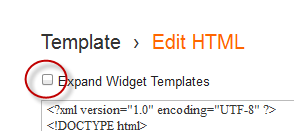
    Step 2. Check the "Expand Widget Templates" checkbox


    Step 3. Find (CTRL + F) this code:

    <title><data:blog.pageTitle/></title>


    Step 4. Replace the code above with this one:

    <b:if cond='data:blog.pageType == "item"'>
    <title><data:blog.pageName/> |<data:blog.title/></title>
    <b:else/>
    <title><data:blog.pageTitle/></title> </b:if>

    Step 5. Click Save Template and you are done.
    Read more ...


    Poll